Type Vietnamese on every platform,
fast, smooth, right for 2026

VietTelex (ViệtTelex) is a free, open-source Telex input method for macOS, built on Apple's InputMethodKit for deep integration — no underline under the word you're typing, the caret always stays at the end, and it works in Terminal and Chrome too.


Free for iPhone & iPad · Android · macOS · Windows · Linux

Why VietTelex?

Rewritten from scratch after nearly 20 years on macOS without a Vietnamese input method that felt truly good, correct and smooth.

MinimalistTelex only, precomposed Unicode only — no extra features.
IntuitiveBehaves exactly like a system input method — nothing to relearn.
Performant~130 ns/key, no background process — smooth no matter how fast you type.

● Native to Apple's IMKit

A real system input method, not a key-blocking app — so per-app typing modes, macOS spelling/prediction/undo/VoiceOver all work correctly.

● Fast — ~130 nanoseconds/key

Spelling rules compiled into a state machine, zero allocation while typing. Type as fast as you like — no lost or scrambled characters.

● Works in Terminal & Chrome

Terminal/iTerm keep the shell's autocomplete; Chrome's address bar, Excel cells and Spotlight all type correctly — where other input methods often break.

● Smart with English & code

Auto-restores google, github…; recognizes camelCase tokens (OmS, JavaScript) so it won't add tone marks by mistake; strict Telex mode for devs.

● Light & private

No background CPU drain, no network connections, collects no data whatsoever.

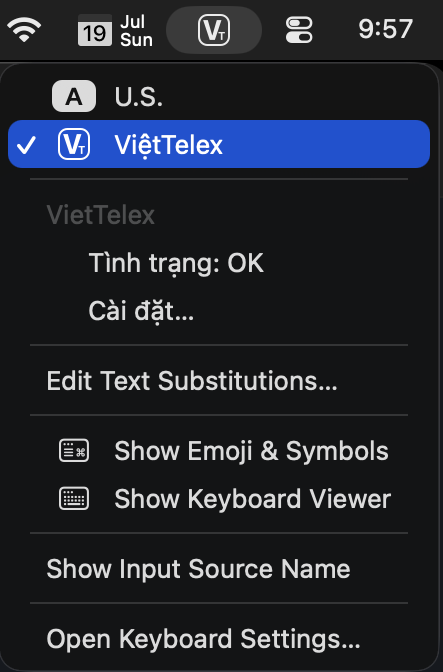
VietTelex menu in the macOS menu bar
The VT badge in the menu bar — pick the input source like any system one.
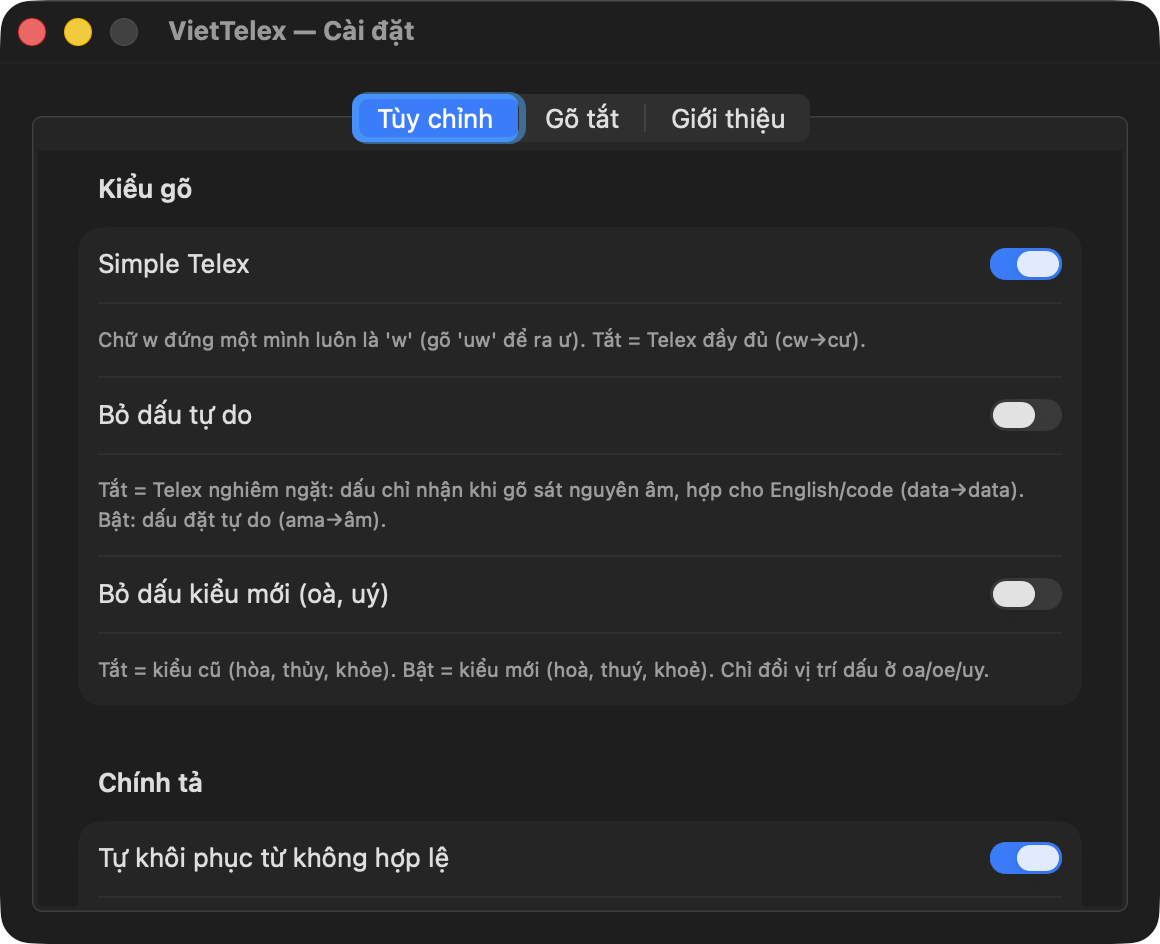
VietTelex Settings window
Settings: Simple Telex, free tone placement, old/new style, spell-check, shortcuts.

Install in a minute

Choose one install method: the signed .pkg or Homebrew. Both install the app to ~/Library/Input Methods/VietTelex.app; do not install both at once because they manage the same app. iPhone, Android, Windows, Linux: see the download page.

Install through one channel

Download VietTelex-x.y.z.pkg (signed + notarized by Apple) and double-click, or run brew install --cask ptrinh/viettelex/viettelex. Uninstall the current app before switching channels.

Add the input method

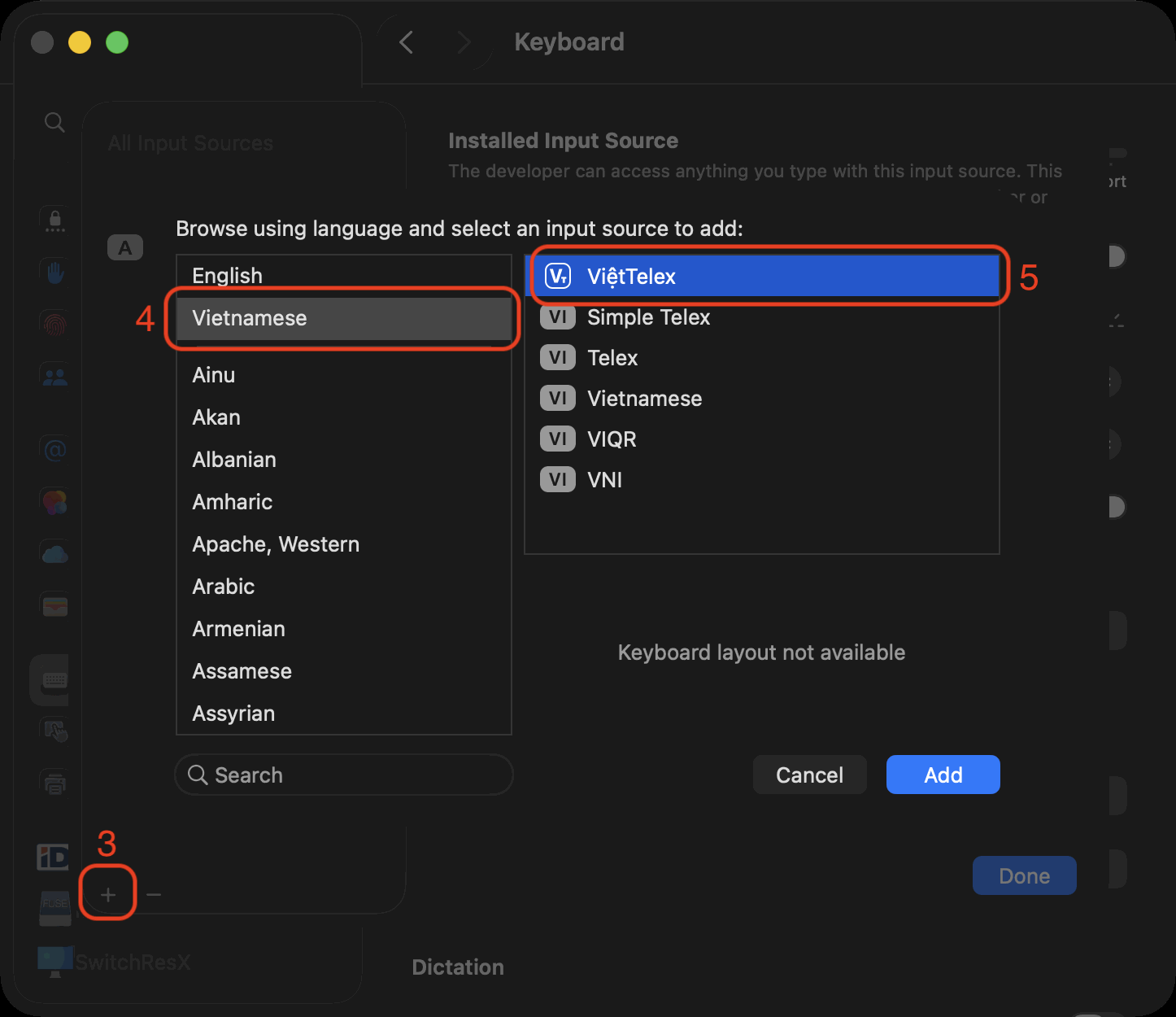
System Settings → Keyboard → Input Sources → Edit… / + → Vietnamese → ViệtTelex → Add.

Adding ViệtTelex in Input Sources
Give it a try

Switch to ViệtTelex with the 🌐 key or ⌃Space. To type in Terminal/iTerm/Chrome, grant Accessibility to VietTelex (Privacy & Security → Accessibility). If an Xcode Debug build is open, quit it and launch the installed app; its permission identity is separate.

Support & feedback

A free, open-source project. If you find it useful you can support the author — or send feedback and bug reports.